
Live Fleet Operations Dashboard

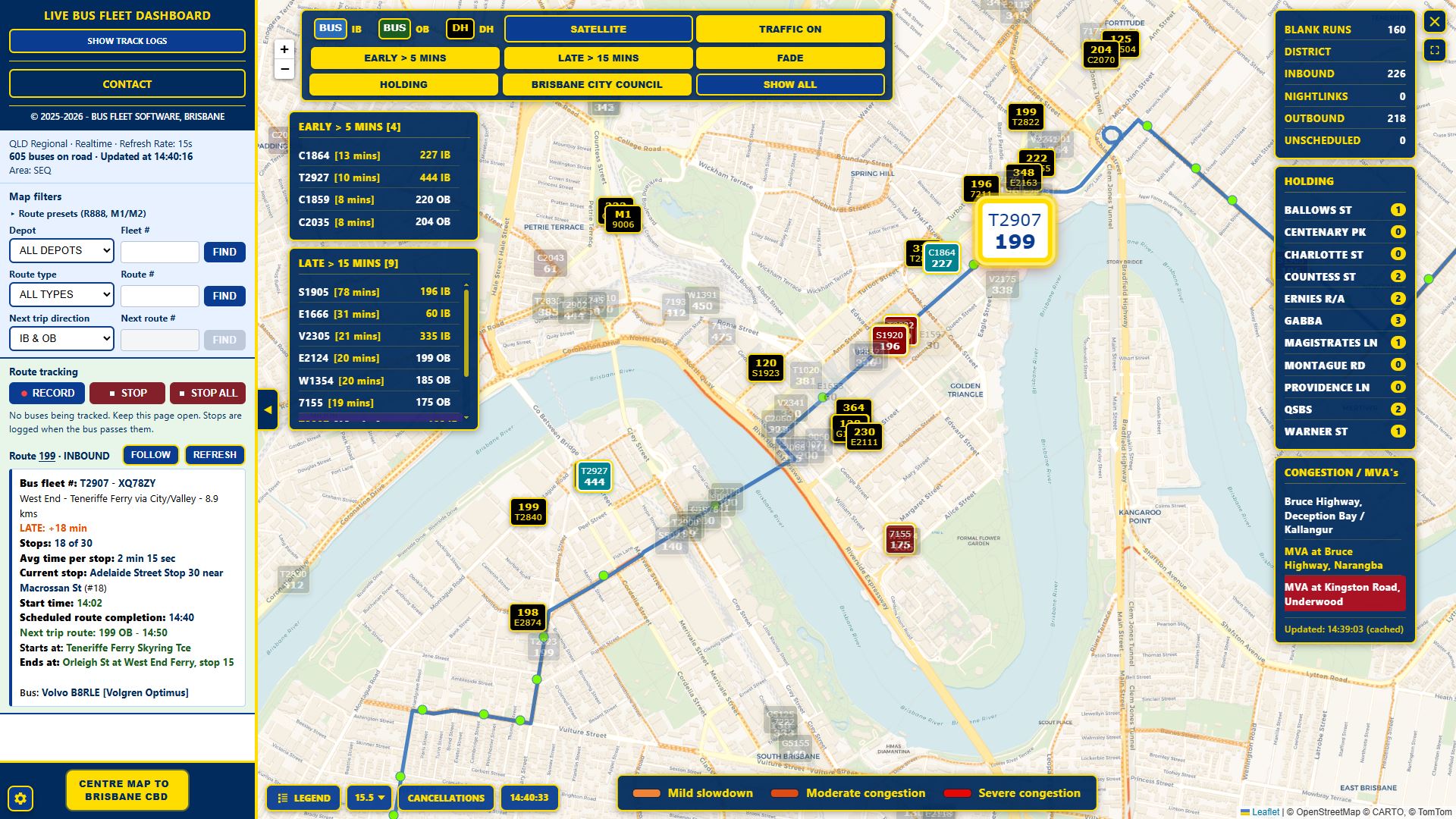
A control-room live map for Queensland bus fleets. Reporting vehicles appear on one screen with route and fleet numbers, refreshed from GTFS-Realtime about every 15 seconds.

Tap image to enlarge

What it does

The dashboard shows the live fleet position feed on a map, with lists and filters for late and early running, depots, route types and network incidents. Settings are saved per PC. Access is by authorised key.

Live map

  • Whole-network map with official GTFS route colours
  • Route number and fleet number on each bus icon
  • Inbound, outbound and dead-head status colour coding
  • Dead-head icons show next route or DEPOT when not in passenger service
  • Terrain and satellite map views
  • Selectable zoom levels and collapsible control sidebar
  • On-map Brisbane local clock and bus icon colour legend
Search and filters

  • Find by fleet number (centres the map) or route number
  • Next-route allocation find — buses whose next trip matches a route and direction
  • Depot filter for a depot catchment
  • Blank runs, district/school and NightLink filters
  • Category counts for inbound, outbound, blank, district and NightLink
  • Legend isolate filters to focus on one status at a time

On-time performance

  • LATE and EARLY lists driven by GTFS-Realtime schedule variance
  • Click a list row to centre that bus on the map
  • Late and early minute thresholds configurable in Settings (1–99)
  • FADE mode dims other buses so late/early services stand out
  • Severity colours for late, very late and early
  • Waiting before departure is not treated as early

Vehicle detail and follow

  • Sidebar detail for the selected bus (route, trip, headsign, status, delay)
  • Expanded detail view with a mini-map of the bus location
  • FOLLOW mode keeps the map centred on a chosen bus
  • Confirm dialog when stopping follow

Holding areas

  • Holding areas list in the sidebar
  • Live buses-in-holding counts per geofence
  • Configurable holding geofences (name, location, radius)
  • Show/hide toggle, click-to-centre and pin for each location

Congestion and traffic

  • Congestion / MVA panel for major roads
  • Severe congestion and accident alerts with map pins
  • New MVA flash alert for fresh incidents
  • Optional live traffic overlay and traffic colour legend

Shift tracking and exports

  • Start tracking for a selected bus; stop one bus or stop all
  • Stop-passage style shift logs with on-time / early / late status
  • Route-change highlighting when the bus changes trip
  • Session summary with average on-time, early and late percentages
  • PDF export of shift logs
  • Hourly fleet snapshots for historical context

Settings and access

  • Settings for late/early thresholds and preferred default zoom
  • QLD run area and fleet agency selection
  • Settings saved per PC (browser)
  • Secure key access for authorised users
  • Startup feed checks with automatic retry

More information

Designed for Queensland control rooms, depot counters and dispatch desks. Works with Translink SEQ GTFS schedule and GTFS-Realtime vehicle positions.